
The Lightroom to iPhoto plugin exports the selected photos from Adobe Lightroom to iPhoto and creates an album with the exported photos if needed.
Why would one like to duplicate photos from Lightroom in iPhoto? Well, Lightroom is my main photo repository but I miss the tight integration with Mac OS X like iPhoto has. iPhoto makes it easy to browse your photo library from different applications (like Finder and Mail) or export the photos to external devices (like the iPhone or iPod), Ligthroom doesn't.
The plugin was tested with Adobe Photoshop Lightroom 1.3.1 and iPhoto '08 7.1.1, other versions may work but I didn't check.
Installing is pretty easy:
To install manually, move the plugin folder to /Library/Application Support/Adobe/Lightroom/Modules/ to install for all users or move it to ~/Library/Application Support/Adobe/Lightroom/Modules/ if you only want to install the plugin for yourself. In either case you'll have to create the Modules folder within the Lightroom folder if it's not already there.
Restart Adobe Lightroom if it was running.
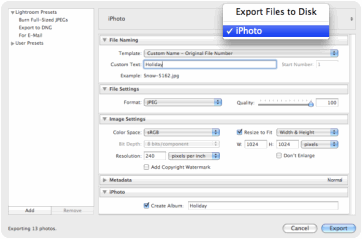
Just export your photos like you would normally do but select iPhoto from the top area of the export dialog. Set the options (resolution, export format, create an iPhoto album or not, etc.) and export your photos.
To uninstall the plugin you just need to delete it from the ‘Modules’ folder or move it to where Lightroom won't find it.
All Adobe Lightroom plugins are written in Lua. It's not possible to address the iPhoto API directly from Lua as the API is only available for AppleScript. The plugin exports the photos to a temporary location with Lua and triggers an AppleScript that imports the photos in iPhoto. The workaround is ugly for various reasons (an intermediate file is used for the Lua - AppleScript communication, the user sees the AppleScript popping up when exporting, etc.) so if anyone knows a decent Lua to AppleScript bridge it would be nice to know.
It's also the very first time I used Lua so feel free to optimize the code where needed. I'm planning to add the following when I can:
Features I would like to add but the iPhoto API doesn't support (yet). Let's hope one of the following iPhoto releases updates the API.
You can fork the source code from the Git repository.
Update: I haven't tested it myself but it should work in Lightroom 2 as Ingemar points out, will test it myself as soon as possible.
same problem as mat/net. err==noErr from Lightroom 2.7 to iphoto 8.1.2 I would really like to use this feature....i'll be watching.
over 2 years later
ops.. not working for me in Light 2.7, on Mac Leopard, from Iphoto 8. Export result in an error, and nothing into iPhoto. Here follows Lightroom's plugin manager log:
Plug-in error log for plug-in at: /Library/Application Support/Adobe/Lightroom/Modules/iPhotoExportService.lrplugin
**** Error 1
This plug-in’s post-processing task did not finish successfully.
Assertion failed: err == noErr
Any clue?
over 2 years later
Small update: I moved the project source code from my old SVN repository to Github. Fork away if you like!
over 2 years later
Hi Simon,
Thanks for the link http://svn.suffix.be/public/lightroom/iPhotoExportService.lrplugin/ but did not find sources from the iPhotoImport.app in the repository. Could you please add it in ?
Thanks pef
about 1 year later
@Pef It has been a while since I worked on it but you are right, maybe it's time to update it now that the new iPhoto is out. It's open source, you should be able to get it from http://svn.suffix.be/public/lightroom/iPhotoExportService.lrplugin/
about 1 year later
Hi ! What a nice plugin ! Did you manage to "name the new iPhoto event" ? It would be great if the new event take the folder name within the picture to export are stored... I tried to take a look into the code to fix this but the iPhotoImport.app of the SVN repository is still "closed-source".
about 1 year later
Wonderfull!!
Tool work with Iphoto 8 and Lightroom 2
11 months later
Great plugin! You could use a hardlink instead of copying the file to avoid duplication. The terminal command in OS X would look like "ln ". I have no idea how this works on Windows or how to do it in LUA... Wikipedia says that it's possible in W2k and beyond. Thanks again!
11 months later
Very cool, thanks.
11 months later
Almost perfect. Works in Lightroom 2. I was looking for an export option that exports to folders as organised in LR. I use folders to organise photos per project or event and it is a drag to export every folder individually to keep it organised.
8 months later
Just wanted to add that this plugin works flawlessly with Lightroom 2.0.
I don't see any AppleScript pop-ups but photos are added along with ratings and tags, as expected.
8 months later
I've been looking for something like this for so long!! Thanks so much for your hard work.
6 months later
Brilliant. So simple, thanks!
4 months later
Wonderful plugin. Thank you so much for making and sharing this.
3 months later
Kris, it makes copies of the files, not references. I know this is not ideal as it keeps 2 versions of the same photo so any ideas about this are more than welcome. Anybody knows how this can be done?
3 months later
Will the photos be copied or will iPhoto just use references to the original files just as LR does? Thanks, Kris.
3 months later
This is nice! Does it export tags also?
3 months later
Just found your plug-in. It does EXACTLY what I needed!
Thanks so much,
Victor
2 months later
Great plug in! it seems to just hang using LR 1.3.1 and iPhoto 4.0.3. It looks like it does the import, but it doesn't complete the script. I have to close out of LR. I'm not very familiar writing scripts, but I can try and take a look at it.
2 months later
No problem Yash, needed it for myself so I can as well share it. Feedback is always welcome!
2 months later
Thanks for the lightroom to iphoto plugin. its really neat!
2 months later
#22 Simon → http://www.suffix.be
over 2 years later